Inserting images in very easy using the WordPress media manager. Place your cursor where the image should appear in your Page/Post Click the button Choose from the Media Library, or upload new image(s) Click on the image so a small tick appears in the top left of the image Fill in the Title, Caption, Alt…
Adding Text Links in WordPress

Highlight the text you’d link to act as the link Click on the Link icon in the editor options Type or paste in the URL to the page you’d like to link to Choose whether the link should replace the page you’re on, or open in a new tab/window Click the Add Link button Linking to…
Linking an image to a document in WordPress
In this example we have two media items already uploaded; An small image that represents our document. The .pdf document we actually want to link to. On the editing screen place your cursor where you’d like the image/link to be inserted Above the editing screen click on Add Media When the Media Library Opens click…
The WordPress Pages Admin Screen
In the left hand admin menu clicking on Pages or hovering over Pages then clicking on All Pages on the flyout menu then will show you a list of all the Pages your WordPress website contains. At the very top of the page you’ll see a Add New button next to Pages – clicking this…
Posts versus Pages
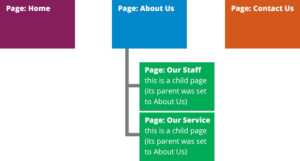
WordPress comes with two main content types as standard; Posts and Pages. We’ll take a look at Pages first. WordPress Pages Pages are used for more static content, i.e. content that doesn’t changes very often, if at all. An ‘About Us’ page is an ideal use of a WordPress ‘Page’. Pages can be hierarchical, meaning…
Edit a Navigation Menu in WordPress
In this lesson we’ll edit an existing WordPress navigation menu. Hover over the Appearance menu option in the left-hand navigation menu and in the fly-out menu, click the Menus link. Alternatively, click the Appearance menu option and then click the Menus link underneath. Along the top of the menu pages you’ll see two tabs, Edit…
The WordPress Admin Menu
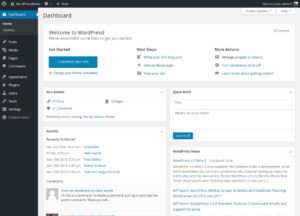
Down the left hand side of the screen you’ll see your main admin navigation options. Here is where you’ll find all the options to edit and update your website. Try hovering over some, you’ll see that some have flyout menus containing more options. A standard WordPress site will have the following options; Dashboard This displays…
The WordPress Toolbar

As soon as you’re logged in you’ll notice along the top of the screen the WordPress Toolbar. This appears across the top of all the admin screens and remains in place for as long as you’re logged in to the website. Normal visitors to your website won’t see this. Notice your site’s name over the…
Logging in to WordPress
Open up your browser and head to your WordPress website. In the browser’s address bar add /wp-admin to the end of the url. Fill in your username and password. click the log In button. You should now be at the Dashboard screen in WordPress. If http://yourwebsite.co.uk/wp-admin doesn’t work try http://yourwebsite.co.uk/wp-login.php instead. If you’ve forgotten your…