I’ve been using my own Parent Theme for WordPress sites since April of 2016, and since then I’ve been through five versions, the last being version 1.0.5. There have been a lot of advances in WordPress since 2016, especially around the customiser. Previously I was using the Redux Framework to handle theme options, so with…
Using a Page as your Homepage
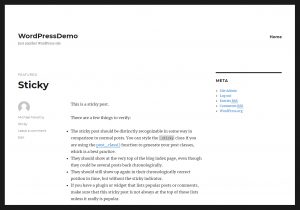
By default the homepage of a WordPress website will look like a blog; displaying your Posts in reverse chronological order (latest to oldest). WordPress lets you change this and use any Page as your homepage instead. We’re going to need two Pages created, one will be our new homepage, the other will be a page…
Adding a new Page in WordPress
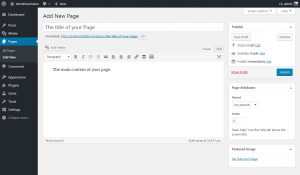
The are two ways to add a new Page to your WordPress website either; In the top bar hover over the + New link, and in the dropdown click on Page. Or in the left hand admin menu click on Pages then Add New. Alternatively hover over Pages and click Add New on the flyout…
Starter, Parent, Child and Grandchild Themes
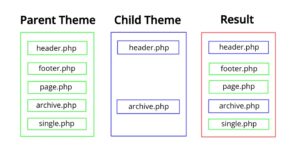
Towards the end of 2015 I shifted my working method and started using the Parent and Child functionality of WordPress themes to power all my new clients websites. Previously to this I used a Starter Theme that got customised to each individual clients needs. What is a Starter Theme? A starter theme is basically a bit of…
Adding a Simple Product in WooCommerce
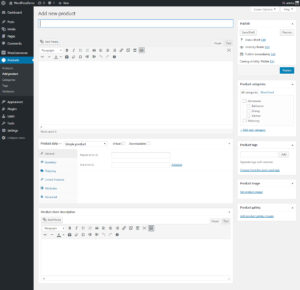
In the left hand admin menu click on Products then Add product. Alternatively hover over Products and click Add product on the flyout menu that appears. Under Add new product Fill in the product name and the product description under this. Text entered here is usually displayed under the main product image on the Description…
Adding Grouped Products in WooCommerce
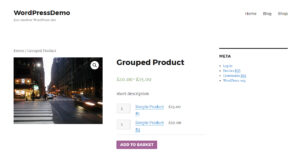
The WooCommerce Grouped Product type allows you to group together a selection of Simple Products. Think of it simply as a product page that displays a list of related products where users can add them all to their cart in one go. Customers still have the option to choose products from the list, and change…
Assigning Attributes to Products in WooCommerce
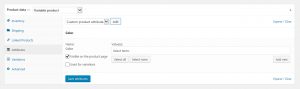
Assigning attributes to Products works the same regardless of the Product Type you’re working on; Simple, Grouped, External/Affiliate or Variable – the only difference is Variable Products will show an additional checkbox Used for Variations. There are two ways to assign attributes to your products in WooCommerce. The first way is to use attributes you’ve…
Managing Menu Locations in WordPress
There are two concepts to grasp when working with navigation menus in WordPress, the first part in the actual menu itself, the second part is menu locations. Once you have a menu created you then need to tell WordPress where you like it displayed on your website. About Menu locations Most WordPress themes define locations…
Setting up Categories in WooCommerce
In the left hand admin menu click on Products then Categories. Alternatively hover over Products and click Categories on the flyout menu that appears. If you already have some categories set up in your WooCommerce store you’ll see them listed over the right hand side of the screen. Name Give your category a name. Slug WordPress will…